TeamViewer “commercial use suspected”: what to do
In short: if free TeamViewer decides you use it for work, it starts limiting your sessions. The only way to lift the limit is a reset request on the TeamViewer site, reviewed within 72 hours. Below, step by step, following TeamViewer’s official instructions.
Why it happens
Free TeamViewer is allowed for personal use only. The software compares how you use it with typical private and business usage. If it looks like work, you get a “commercial use suspected” message and sessions start ending with a timeout.
Not only a device number (TeamViewer ID) but also a TeamViewer account can be flagged. It most often hits people who help several relatives or connect to several of their own computers.
How to lift the limit: a reset request
According to TeamViewer’s official instructions:
- Open teamviewer.com/reset and press the start button.
- Enter your name and the email of your TeamViewer account, and briefly describe how you use the software.
- Enter every TeamViewer ID involved in your connections: your own and the devices you connect to. One form takes up to 10 IDs.
- Accept the privacy policy and submit.
TeamViewer says it reviews requests within 72 hours and replies by email. There is no other way to remove the suspicion: according to TeamViewer, it is removed only after a positive reply from their specialists.
Common mistakes in the request
- Not all IDs listed. If several devices are limited, list all of them — otherwise some stay limited.
- The wrong email. It has to be the email of the TeamViewer account you sign in with.
- A request is already pending and the form will not take a new one. Users on the TeamViewer forum report that the form then shows the earlier request — in that case you can only wait for a reply to the first one.
If you really do use it for work
If you help clients or connect to work computers, that is commercial use, and TeamViewer’s rules ask for a licence. The first paid plan, Remote Access, costs
If the limit keeps coming back
If you keep getting flagged although you only help your family, it is worth trying a service without such a check. With RudyDesk two devices are free forever, including for work: there is no commercial-use check and no session length limit. You do not need to uninstall TeamViewer — the apps do not interfere with each other.
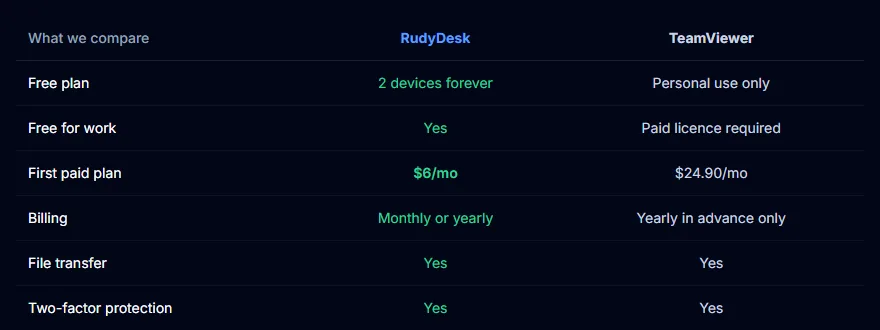
A detailed comparison is on the “TeamViewer alternative” page.
Frequently asked questions
Will reinstalling TeamViewer help? The official instructions do not offer that: the suspicion is removed only through a reset request.
How long does the reply take? TeamViewer says requests are reviewed within 72 hours.
Can I use RudyDesk alongside it? Yes. You can install RudyDesk next to TeamViewer and compare them on your own devices.