← All posts

TeamViewer, AnyDesk or RudyDesk: which to choose for home use

4 October 2026
TeamViewerAnyDeskcomparison

In short: for home use all three services connect you to a computer and transfer files. The differences are the free-use rules, the price and what has to be installed on the other side. Below, task by task, with competitor prices as of 4 October 2026.

Is it free

TeamViewer and AnyDesk are free for personal use only. If the software decides you are working, TeamViewer starts limiting sessions until a request is reviewed (up to 72 hours), and AnyDesk asks for a licence.

With RudyDesk two devices are free forever, including for work, with no commercial-use check and no session length limit. You need a paid plan only for more devices.

What it costs when free is not enough

  • TeamViewer: the first paid plan, Remote Access, is
4.90 a month billed yearly, with three devices for unattended access.
  • AnyDesk: Solo is
  • 8.90 a month billed yearly — $346.80 up front.
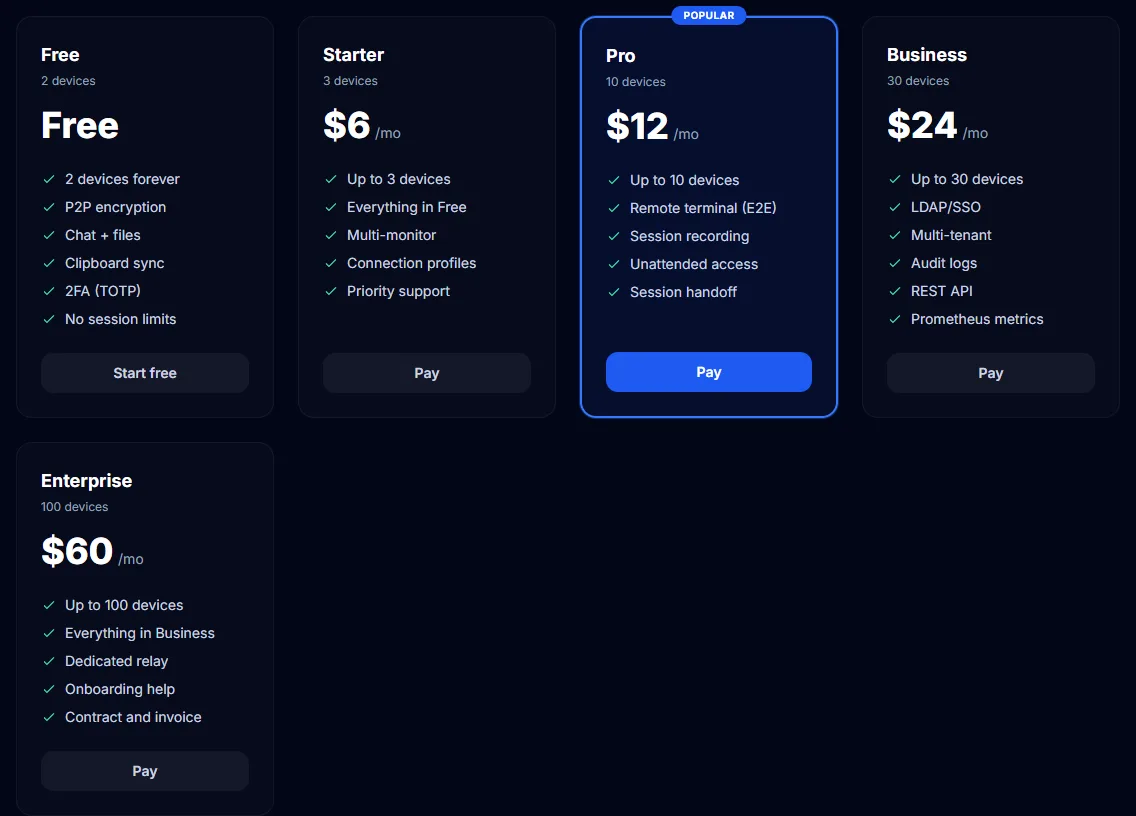
  • RudyDesk: from $6 a month, billed monthly or yearly (yearly is about 17% cheaper).
  • RudyDesk pricing
    RudyDesk pricing

    Helping your parents

    The hardest part of helping family is getting them to install an app and read out a number. TeamViewer and AnyDesk need an app on the other side. With RudyDesk you can send an invite link: it opens in the browser, works once and for 15 minutes, and the connection still has to be accepted. RudyDesk highlights an unknown ID with a warning before the Accept button — a defence against “support” scammers.

    Reaching your own computer from afar

    All three have a permanent password for unattended access. In RudyDesk it never goes to the server or the other side: sign-in is confirmed with a one-time challenge. Connecting without confirmation is a Pro-plan feature in RudyDesk; on the free plan the person at the computer presses Accept. If the computer is asleep, RudyDesk can wake it through another device on the same network, on a schedule, or with an ESP32 board that costs a couple of dollars.

    From a phone

    All three let you connect to a computer from a phone. With RudyDesk there is nothing to install on the phone — opening rudydesk.com/app in the browser is enough. RudyDesk cannot share the iPhone’s own screen, though: Apple does not let a browser share the phone’s screen. AnyDesk can show an iPhone screen, but according to AnyDesk’s help only when connecting from a licensed client.

    The comparison in tables

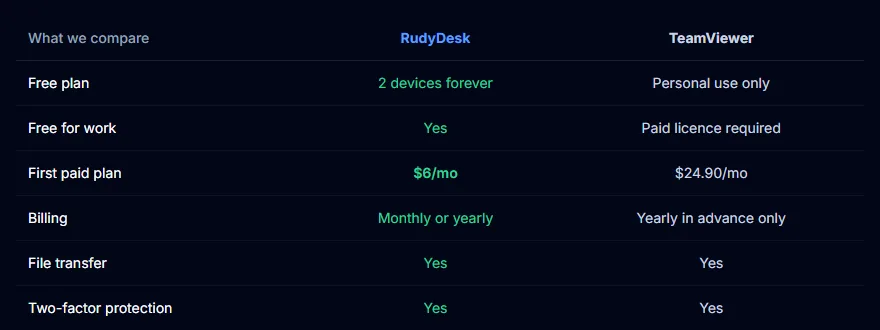
    RudyDesk vs TeamViewer: the facts
    RudyDesk vs TeamViewer: the facts
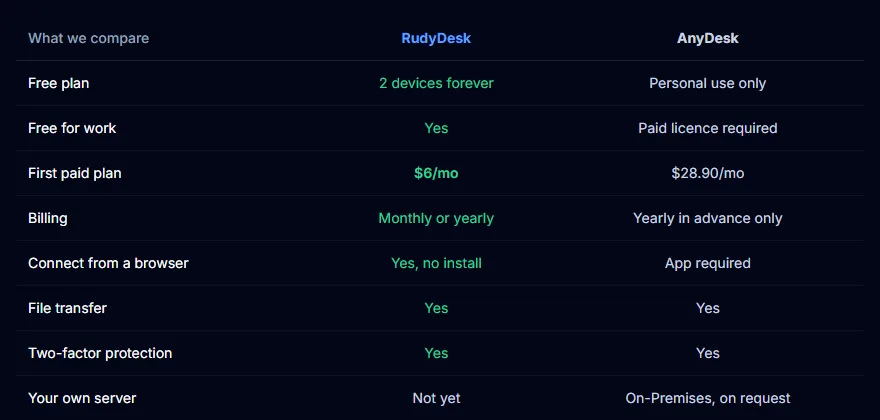
    RudyDesk vs AnyDesk: the facts
    RudyDesk vs AnyDesk: the facts

    What RudyDesk cannot do yet

    Which to choose

    If you already pay for TeamViewer or AnyDesk at work and it suits you, there is no reason to switch. If you need home remote access without licences and “commercial use” warnings, try RudyDesk: download it at rudydesk.com/download or open rudydesk.com/app. No need to uninstall the old app.

    Frequently asked questions

    Which is more secure? All three encrypt the connection. In RudyDesk screen, sound and files go directly between devices, and the server only helps them find each other.

    Can I use several at once? Yes, the apps do not interfere with each other.

    Do I need to sign up for RudyDesk? No. An email account only helps if you want one licence and a shared device list across all your computers.