Best free remote desktop software in 2026: an honest comparison
In short: Chrome Remote Desktop, RustDesk and TightVNC are fully free; AnyDesk and TeamViewer are free for personal use only; RudyDesk gives you two devices free forever — including for work. Below are each tool’s terms according to their official sites (checked on 4 October 2026).
The comparison in one table
| Software | Free | First paid plan | Connect from a browser |
|---|---|---|---|
| AnyDesk | personal use only | Solo — $28.90/mo, billed yearly | no |
| TeamViewer | personal use only | Remote Access — $24.90/mo, billed yearly | — |
| Chrome Remote Desktop | fully, Google account needed | no paid plans | yes, in Chrome |
| RustDesk | fully, public source (AGPL-3.0) | paid server for organisations | — |
| TightVNC | fully, public source (GPL) | — | — |
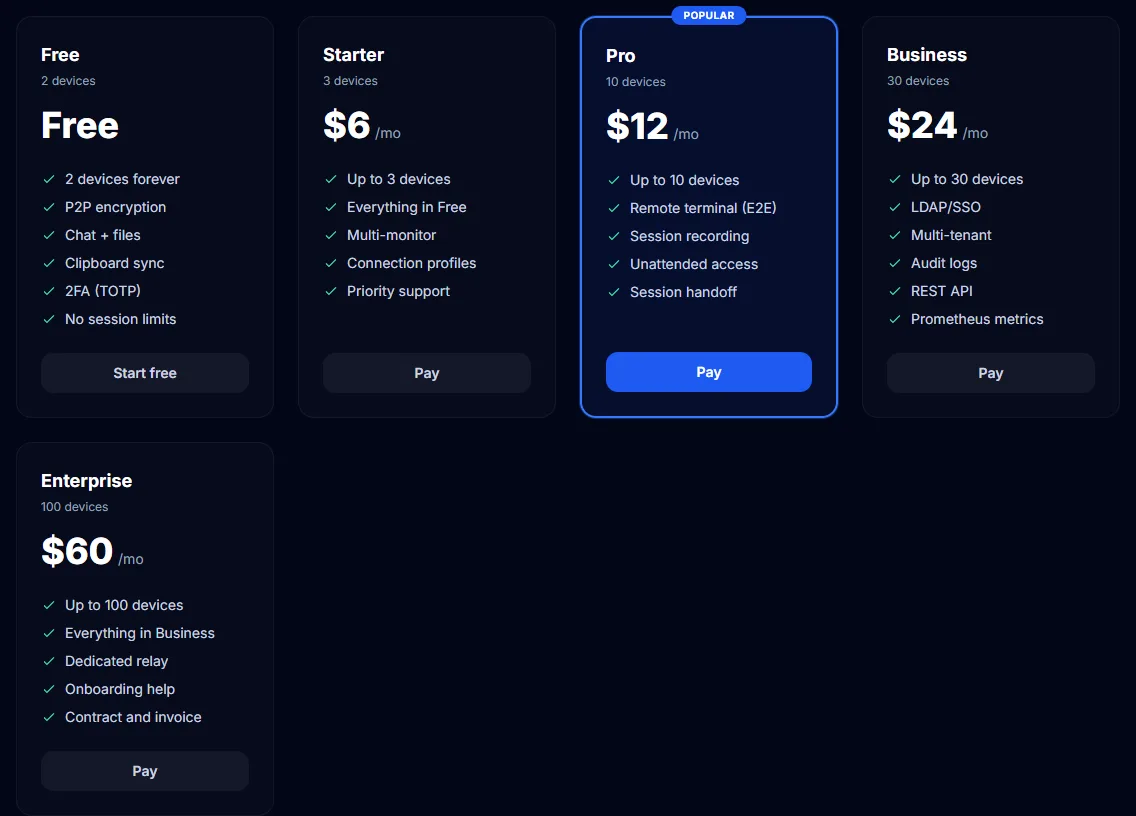
| RudyDesk | 2 devices forever, work included | from $6/mo, monthly | yes, any browser |
A dash means we have not checked it and do not claim anything.
AnyDesk
Free for personal use only; if it suspects work use, it asks you to buy a licence. The first paid plan, Solo, costs $28.90 a month and is billed yearly only. Its strength is an on-premises server for large companies. More: “AnyDesk alternative”.
TeamViewer
Also free for personal use only, and it limits sessions when it suspects commercial use. The Remote Access plan is $24.90 a month billed yearly. What to do if you are blocked: “TeamViewer commercial use suspected”.
Chrome Remote Desktop
Fully free, runs in Chrome and transfers files. It needs a Google account and has no self-hosted server. More: “Chrome Remote Desktop alternative”.
RustDesk
Free, with public source code (AGPL-3.0); you can run your own server for free. If your own server and public code matter to you, it is a strong choice — but you set up the server yourself. Comparison: “RustDesk or RudyDesk”.
TightVNC
Free, public source (GPL). According to its own FAQ only the password is encrypted, and for internet connections it recommends an SSH tunnel. Good on a local network without internet. Comparison: “VNC alternative”.
RudyDesk
Two devices free forever, including for work, with no session length limit; beyond that from $6 a month, billed monthly. You can connect from any browser and help by link without IDs or passwords. What it lacks: public source code and a self-hosted server; connecting without approval is on the Pro plan and above.
Which to choose
- Help family and reach your own PC, free and with no time limit — RudyDesk, or Chrome Remote Desktop if you have a Google account.
- Your own server and public code — RustDesk.
- Local network only, no internet — TightVNC.
- A large company with its own server — AnyDesk On-Premises or TeamViewer.
Frequently asked questions
Which software is free for work? Chrome Remote Desktop, RustDesk, TightVNC and RudyDesk (two devices). AnyDesk and TeamViewer are free for personal use only.
Do I need to install anything on the computer? Yes, every tool installs an app on the controlled computer. With RudyDesk and Chrome Remote Desktop you can connect from a browser.
Where are the most accurate prices? On the official sites — the links are on our comparison pages, along with the date we checked.